
SMM Panel with JazzCash: Adding Funds Step by Step
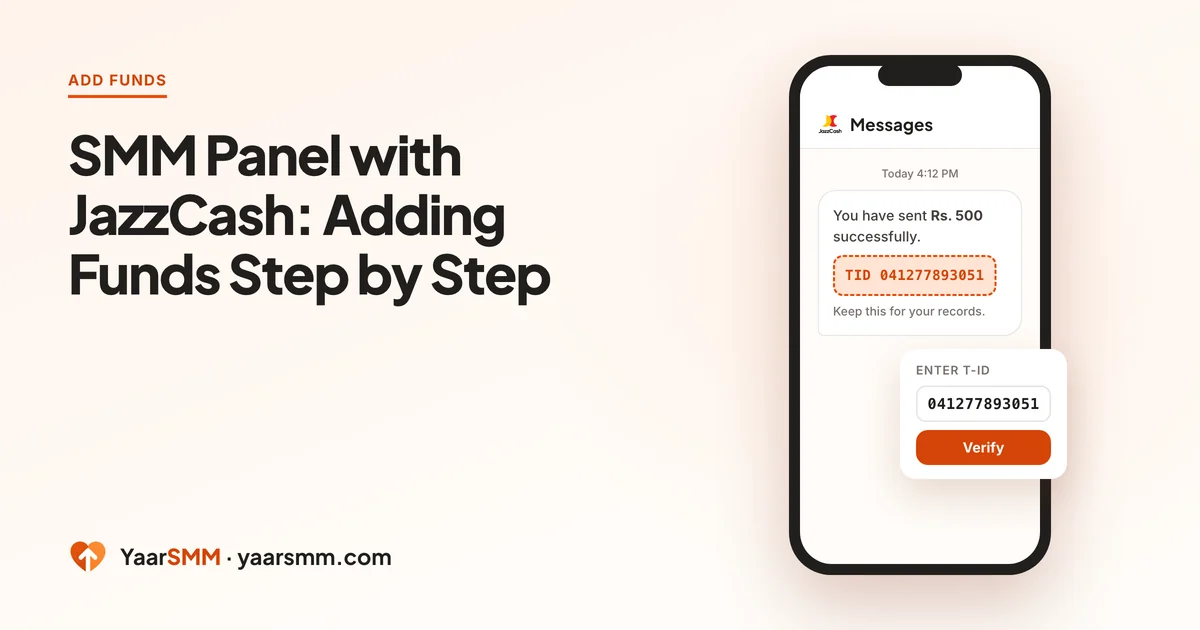
JazzCash works on YaarSMM through the same payment page as every other wallet, but two things are specific to it: the reference is called a TID, and JazzCash sends it to you by SMS as well as on screen. Knowing where that number lives saves most of the trouble people have with a JazzCash top-up.
If you have already used EasyPaisa here, the route is the same and you only need the JazzCash sections below. The full screen-by-screen walk is in SMM Panel with EasyPaisa.
Before you start
Check three things on the JazzCash side first, because the payment page gives you 30 minutes once it opens.
- Your JazzCash balance: enough for the top-up. The YaarSMM minimum is Rs. 200.
- Your sending limit: JazzCash sets daily and monthly limits by account level. A large top-up on a basic account can be refused by JazzCash itself.
- The app is logged in: if JazzCash asks you to re-verify your device or SIM, do it now, not with the timer running.
Paying with JazzCash, step by step
- Start on YaarSMM. Open Add funds, type the amount and choose the JazzCash tile. Press Continue to payment once and wait a few seconds; pressing it again opens a second top-up.
- Pick JazzCash on the payment page. The page opens on cashmaal.com. Choose the EasyPaisa/JazzCash group, then JazzCash inside it.
- Fill in the contact details. The page asks for an email, country and phone number. These belong to the payment page, not to your YaarSMM account.
- Send the amount shown. The page gives an account to send to and the exact amount. Send it from your JazzCash app before the countdown ends.
- Copy the TID. JazzCash shows it on the receipt screen, labelled TID.
- Paste it and verify. Go back to the payment page, paste the TID into Enter T-ID and press Verify.
Your YaarSMM balance updates once the payment is confirmed. You do not need to stay on the page for that.
The TID: on screen and in your SMS
JazzCash is the easiest wallet for finding the reference later, because it sends the TID by SMS straight after the transfer. That matters in two common situations:
- You closed the receipt too fast. Open your messages, find the JazzCash payment SMS, and copy the TID from it.
- You paid from one phone and are verifying on another. The SMS goes to the phone with the JazzCash SIM. Copy the TID from there; do not retype it from memory.
Copy the whole number. One missing digit and it will not match. If the SMS and the receipt show different numbers for different transfers, match the amount and time to your top-up.
When the account shown is a person’s name
On some payments the page asks you to send to a wallet in a person’s name rather than to a company. People stop here, and it is a reasonable thing to stop at.
That account is one the gateway works with to receive this one payment. It is not YaarSMM’s account, and you are not sending money to a stranger with nothing to trace it: the payment page holds your top-up, the amount and the timer, and your TID ties the transfer to it. What Is Cashmaal? explains how that works.
What keeps it safe is following the page exactly: the account it shows, the amount it shows, before its timer ends, then Verify. Never send to an account someone gives you in a message or a call.
Four JazzCash slips that hold up a top-up
These come up again and again, and each one is easy to avoid once you know it.
- Topping up JazzCash with the timer running. If your JazzCash balance is short, load it first, then start the top-up on YaarSMM. A retailer load can take longer than the 30 minutes the page gives you.
- Sending to the wrong kind of account. The page shows a mobile wallet to send to. Send it as a wallet transfer to that number, not as a bank transfer or to a CNIC.
- Copying the TID from the wrong SMS. JazzCash sends a message for every transaction, including airtime and bill payments. Use the SMS for this transfer, with the same amount and time.
- Sending a rounded amount. If the page says Rs. 750, send Rs. 750, not Rs. 800 to be safe. A different amount can leave the payment unmatched.
Paid, but no balance yet
Work through these in order.
- Did you press Verify? If the payment page is still open, paste the TID and press Verify now.
- Give it some time. After Verify, confirmation can take a few hours. Your balance updates by itself when it arrives.
- Has the page expired? Open Add funds and use Already paid? Send your receipt. Enter the TID, the amount and the time you paid, and attach the receipt or a screenshot of the SMS.
Do not send the money again while you wait. A second payment does not speed up the first.
JazzCash or EasyPaisa?
If you only have JazzCash, use it; the route works. If you hold both, it is worth knowing that JazzCash top-ups more often end up waiting for a receipt check than EasyPaisa ones do. EasyPaisa is the smoother route when you have the choice and want the balance quickly. JazzCash, NayaPay or SadaPay compares the other wallets.
Once the balance is in, the price list shows what each service costs per unit, and the minimum order on each.
Questions
Where do I find the TID for a JazzCash payment?
On the receipt screen JazzCash shows after the transfer, labelled TID. JazzCash also sends it by SMS, so you can copy it from the message if you closed the receipt.
Is there a fee for adding funds with JazzCash?
No. Rs. 500 sent from JazzCash means Rs. 500 on your YaarSMM balance.
Why does the payment page show a person's name instead of YaarSMM?
For some payments the gateway gives you a wallet to send to that belongs to someone it works with, not to YaarSMM. That is how the route works. Send to the account the page shows, for the amount it shows, before the timer ends.
My JazzCash payment went through but my balance is still the same. What now?
Check that the TID went into Enter T-ID and that you pressed Verify. If you did, confirmation can take a few hours. If the page has expired, use Already paid? Send your receipt on the Add funds page. Do not pay a second time.
Ready when you are.
Create a free account