
Pending, Processing, Partial: What Your Order Status Means
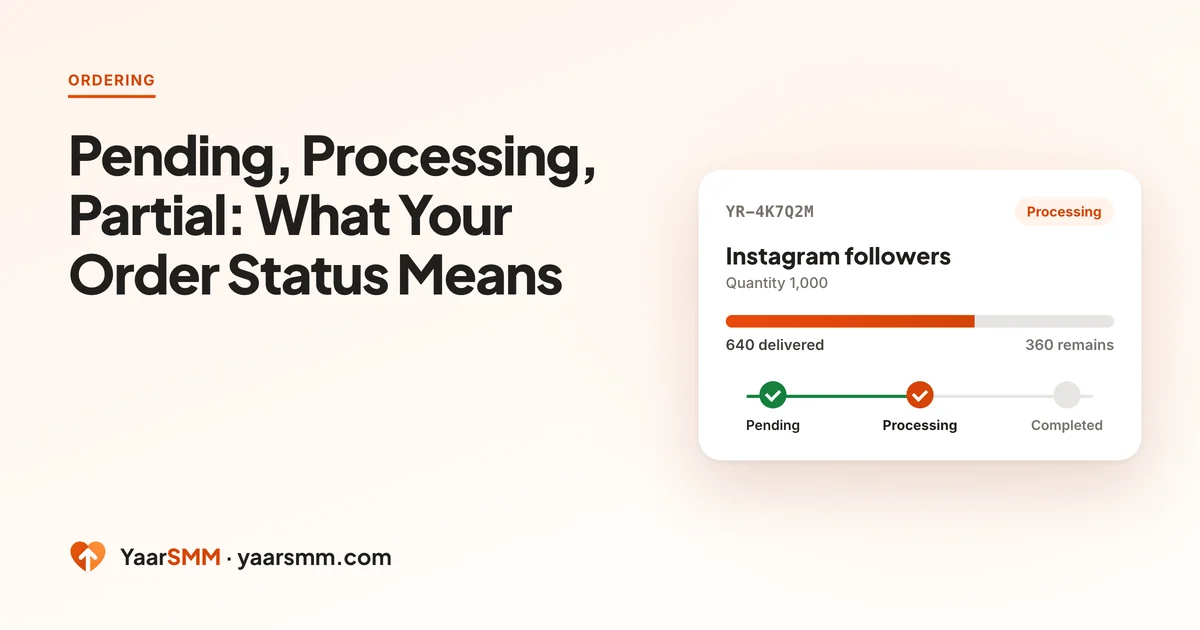
After you place an order, its status is the quickest way to know what is happening. Each one means something specific for your balance and for what you should do next. Here they are in the order you will usually see them.
The statuses, from start to finish
- Pending: the order is received and waiting to be sent for delivery.
- Queued: the order is lined up to start. Large orders and busy services can wait here a little longer.
- Processing: delivery is under way. The count is moving, often in steps rather than all at once.
- Completed: delivery has finished at the quantity you ordered.
- Partially delivered: some of the order arrived and the rest could not be delivered. The undelivered part has gone back to your balance.
- Cancelled: the order stopped. Check its details for any balance adjustment.
- Refunded: a refund is recorded. Transactions shows the amount.
When an order seems stuck
Most orders start within an hour. When one sits at Pending or Queued for longer, the cause is usually on the link side:
- The profile or post is private. Delivery needs public content. Open your link in a private browser window: if it asks you to log in, it cannot be delivered to.
- The link is wrong. A typo, a deleted post, or a link to the profile when the service needs a post.
- The post is brand new. Very fresh posts sometimes take a little longer to be picked up.
- The service is busy. Popular services queue orders; they still start in turn.
If it has been two to three hours, open a support request with the order ID. The ID is all that is needed to check it.
What a partial delivery means for your money
You pay for what you ordered, and if only part arrives, the rest is refunded to your YaarSMM balance automatically. The order details show the delivered amount, so you can see exactly what you received.
The usual reasons are the same as for a stuck order: the content went private or was deleted during delivery, or the supply for that service ran short.
Completed is not forever
Completed means the delivery finished at your quantity. It does not freeze the number. Every platform removes some followers, likes and views over time, so a count can drop days or weeks later.
That is what refill labels are for. Services whose name ends in 7-day refill cover drops for 7 days after completion: two days after an order completes, a Request refill button appears, and you can ask once per order. Services ending in no refill cost less and are not covered. Check the label on the service card before you buy, as the safety checks guide suggests.
Reading the numbers on an order
Each order shows a few figures besides its status. Knowing what they mean saves a support request.
- Quantity: what you ordered.
- Start Count: the count when delivery began, where the service reports it. It lets you check that delivery came on top of what you already had.
- Delivered and Remains: how much has arrived and how much is left. When an order finishes as Partially delivered, the remaining part is what was refunded.
- Order total: what the order cost from your balance.
Counts on the platform itself can lag behind the order for a while, especially on views. Check again later before deciding something went wrong.
Contacting support about an order
If an order needs checking, the order ID does almost all the work. Add the link if you have changed it, and a short description of what you see. You never need to share your social media password, and nobody from YaarSMM will ask for it.
Large orders and delivery speed
Large quantities are delivered gradually, not all at once. A service might deliver tens of thousands a day, so an order of a few hundred finishes quickly while one in the hundreds of thousands runs for days. Gradual delivery is also gentler on the account than a sudden jump. Each service card shows its own estimate, and an order that is still Processing within that estimate is on track.
Changing your mind mid-order
Some services allow cancellation while an order runs. A Request cancel button appears on the order, with a Rs. 50 fee shown before you confirm. It is a request, not an instant stop: the order may keep delivering while it is handled. If it stops, the undelivered part is refunded and the fee kept. If it cannot be stopped, or there is no answer within 72 hours, the fee comes back and the order carries on. Orders that have finished cannot be cancelled.
Next time you order, compare the minimums and refill labels on the price list first; it saves most of the questions above.
Questions
How long can an order stay Pending?
Most start within an hour. If an order is still Pending after two to three hours, check that the link is public and correct, then open a support request with the order ID.
Where does the money go when an order is partially delivered?
Back to your YaarSMM balance, for the part that was not delivered. The order details show how much was delivered.
Can I cancel an order that is Processing?
On services that allow it, a Request cancel button appears, with a Rs. 50 fee shown before you confirm. It is a request: if the order stops, the undelivered part is refunded and the fee kept; if it can't be stopped within 72 hours, the fee comes back.
My order says Completed but the count is lower. Why?
Completed reflects what was delivered. Platforms remove some followers and likes over time, so counts can drop afterwards. Services ending in 7-day refill cover drops for 7 days after completion.
Ready when you are.
Browse services